ICT 드림업 - 무물 매니저/개발
[무물 매니저] Faiss데이터베이스 사용해보기
kangchaewon
2025. 4. 23. 23:21
Faiss 벡터 데이터베이스에 image-1,2,3저장
from pathlib import Path
from PIL import Image
import numpy as np
import torch
import faiss
from transformers import CLIPProcessor, CLIPModel
import json

model_name = "openai/clip-vit-base-patch32"
clip_model = CLIPModel.from_pretrained(model_name)
processor = CLIPProcessor.from_pretrained(model_name)

def image_embedding(img_path: Path) -> np.ndarray:
    image = Image.open(img_path).convert("RGB")
    inputs = processor(images=image, return_tensors="pt")
    with torch.no_grad():
        emb = clip_model.get_image_features(**inputs)   # [1, 512]
    emb = emb / emb.norm(dim=-1, keepdim=True)          # L2 정규화
    return emb.cpu().numpy().astype("float32")

# 이미지 디렉토리 경로
image_dir = Path("../test-images/")

# 설명을 포함한 메타데이터
image_data = {
    "pic1.jpg": "Peers, flowers, and water kettles",
    "monet_waterlilies.png": "A famous painting by Claude Monet",
    "starry_night.jpg": "A painting by Vincent van Gogh"
}

# 임베딩 벡터와 메타데이터 저장할 리스트
vectors, ids, descriptions = [], [], []

# 이미지 파일에 대해 임베딩 생성하고 메타데이터 저장
# 수정 후 이미지 파일 경로 찾기 (jpeg 파일 추가)
image_files = list(image_dir.glob("*.jpg")) + list(image_dir.glob("*.jpeg")) + list(image_dir.glob("*.png"))
for img_file in image_files:
    try:
        vectors.append(image_embedding(img_file))
        ids.append(img_file.name)  # 파일명 저장
        descriptions.append(image_data.get(img_file.name, "No description available"))  # 설명 저장
    except Exception as e:
        print(f"Error processing {img_file}: {e}")

# 임베딩된 벡터들 합치기
if len(vectors) > 0:
    matrix = np.vstack(vectors)  # 벡터가 있을 때만 호출
else:
    print("No vectors to stack. Please check your image files and embeddings.")

# 벡터의 차원 정보 확인
if 'matrix' in locals():
    d = matrix.shape[1]

    # Faiss 인덱스 생성 (코사인 유사도용)
    index = faiss.IndexFlatIP(d)
    index.add(matrix)

    # Faiss 인덱스를 파일로 저장
    faiss.write_index(index, "image_clip.index")

    # 설명과 파일명을 JSON 형식으로 저장
    meta_data = {"ids": ids, "descriptions": descriptions}
    with open("image_meta.json", "w") as f:
        json.dump(meta_data, f)

    print(f"Saved {len(ids)} image vectors with descriptions.")
else:
    print("No embeddings were generated.")
저장 후, test-1이미지와 가장 비슷한 결과 반환
#!/usr/bin/env python3
# -*- coding: utf-8 -*-
"""
Created on Wed Apr 23 23:12:12 2025

@author: kangchaewon
"""

import torch
import faiss
import numpy as np
from PIL import Image
from transformers import CLIPProcessor, CLIPModel
from pathlib import Path

# 모델 로드
model_name = "openai/clip-vit-base-patch32"
clip_model = CLIPModel.from_pretrained(model_name)
processor = CLIPProcessor.from_pretrained(model_name)

# 이미지 임베딩 함수
def image_embedding(img_path: Path) -> np.ndarray:
    image = Image.open(img_path).convert("RGB")
    inputs = processor(images=image, return_tensors="pt")
    with torch.no_grad():
        emb = clip_model.get_image_features(**inputs)  # [1, 512]
    emb = emb / emb.norm(dim=-1, keepdim=True)  # L2 정규화
    return emb.cpu().numpy().astype("float32")

# 이미지 디렉토리 경로
image_dir = Path("../test-images/")

# Faiss 인덱스 불러오기
index = faiss.read_index("image_clip.index")

# 쿼리 이미지의 임베딩을 구하는 함수
def search_similar_image(query_img_path: Path, index: faiss.Index, top_k=1):
    query_embedding = image_embedding(query_img_path)  # 쿼리 이미지 임베딩
    query_embedding = query_embedding.astype('float32')  # 타입 변환

    # Faiss 인덱스를 사용하여 가장 유사한 이미지 검색
    distances, indices = index.search(query_embedding, top_k)  # top_k=1로 설정하여 가장 유사한 하나만 찾음

    return distances, indices

# 검색할 이미지
query_img_path = Path("../test-images/test-1.jpg")  # 검색할 이미지 경로를 지정

# 검색
distances, indices = search_similar_image(query_img_path, index)

# 결과 출력
print(f"Query image: {query_img_path.name}")
print(f"Most similar image index: {indices[0][0]}")  # 가장 유사한 이미지의 인덱스
print(f"Distance (similarity score): {distances[0][0]}")  # 유사도 점수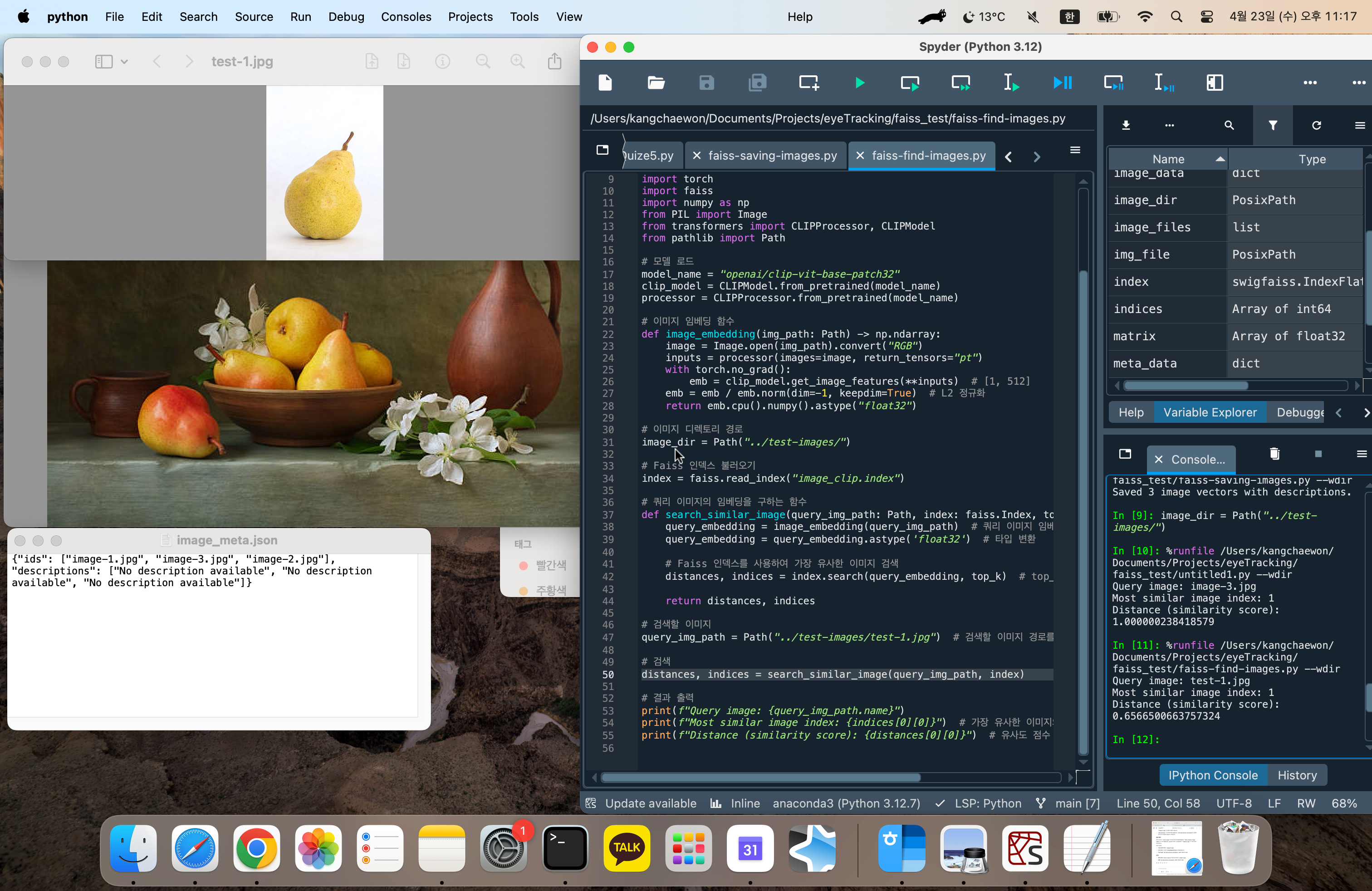
Query image : 검색한 이미지
Most similar image index : 가장 비슷한 결과로 인식된 이미지 인덱스
{"ids": ["image-1.jpg", "image-3.jpg", "image-2.jpg"], "descriptions": ["No description available", "No description available", "No description available"]}
ids가 1인 image-3이 결과값
image-3은 정물화 이미지이고, test-1이미지는 배 이미지.
결과값을 잘 인식하는 것을 볼 수 있음.